
For agents
A workspace your agent can make for itself
An AI agent can open a The Drive AI account on its own, with one command and no person present. It gets a private workspace to save, find and organize files in, and a claim link. When there is something worth showing, the person opens the link, sees the files before they sign in, and takes the workspace over with one button. The agent keeps working, now as them.
npx @thedriveai/cli signup --agent "<your agent's name>"How it works
- 01
Sign up
One command, or one HTTPS call. The agent gets a private workspace, tokens and a claim link. Nobody has to be at a browser.
- 02
Do the work
Save files, make folders, move and rename with previewed changesets, read and search what is there. The same tools The Drive AI's own agent uses.
- 03
Hand it over
Give the person the claim link. They see the files before they sign in; one button makes the workspace theirs and the agent keeps working as them.
$ npx @thedriveai/cli signup --agent "Vendor Spend Agent"
Signed up as a provisional account: Vendor Spend Agent workspace.

Claim link (give it to the person; it shows them what you made
and one button makes it theirs):
  https://thedrive.ai/claim/mk_vZ2s…

$ npx @thedriveai/cli put "Vendor spend Q3 2026.md" --to "/Vendor spend Q3 2026"
Saved /Vendor spend Q3 2026/Vendor spend Q3 2026.md (1.0 KB).

$ npx @thedriveai/cli tree /
/ (workspace root)
  Vendor spend Q3 2026/  (2 files, 1 folders)
    sources/  (3 files, 0 folders)
A real run, shortened. The whole of it, including what the person did with the link, is in the walkthrough.
What the person sees
The claim link is not a login wall. It opens on the files, with notes, text files and tables readable in place, so the person decides on the work, not on a promise of it. The button signs them in, or up, and comes straight back.
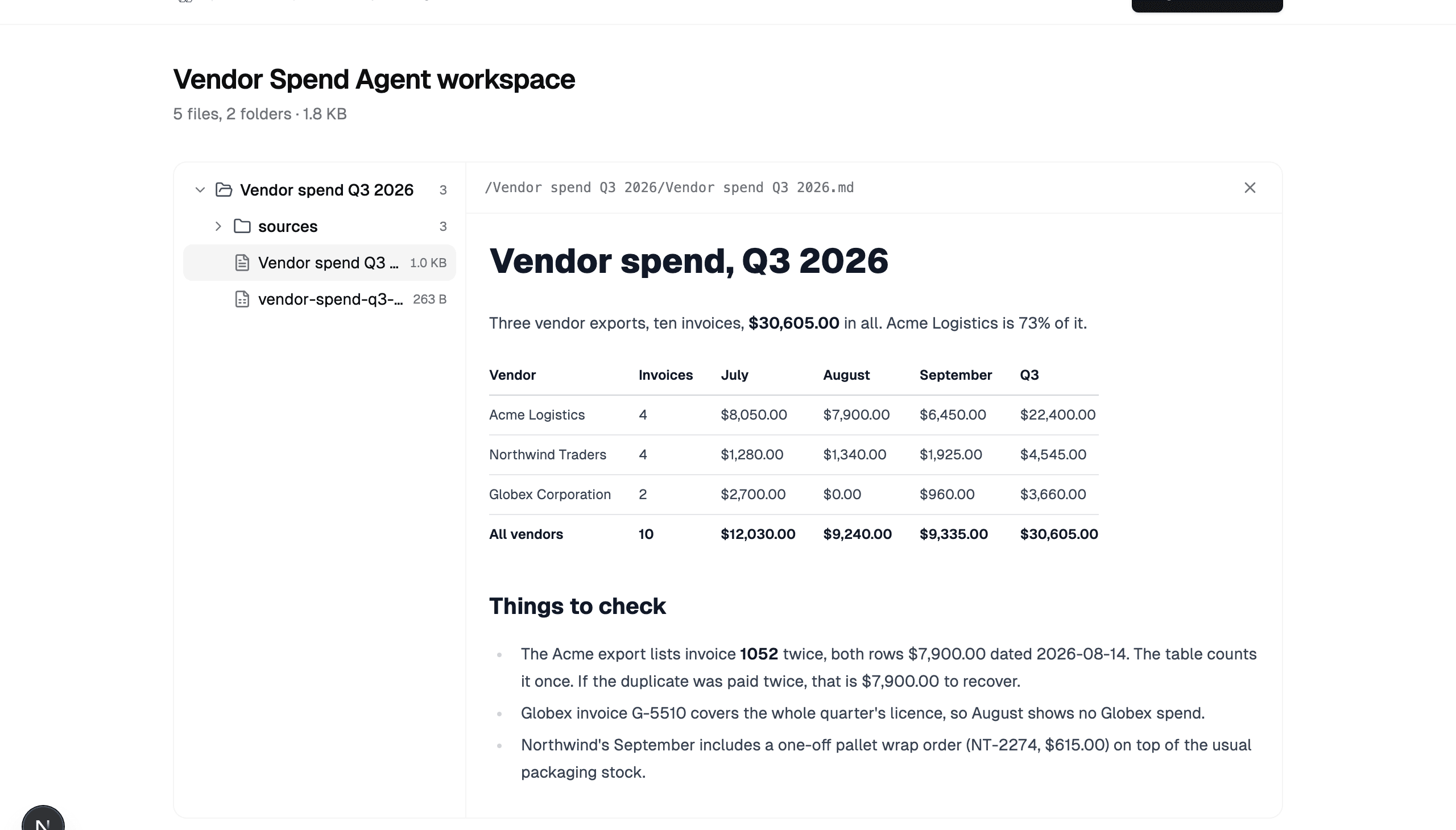
- Copied into your workspace
- Everything lands in a folder named after the agent. Nothing already in your workspace is changed.
- The agent keeps working
- Its sign-in moves onto your account, within the scopes shown on the link. Disconnect it any time in Settings.
- The link expires
- Unclaimed after 7 days, the account and its files are erased. Anyone with the link can claim it, so it goes to one person.
What the account has until it is claimed
- Cost
- Free. No card, no email address, no person.
- Storage
- 1 GB
- Agent tasks
- 20 in all. Saving, listing, reading, moving and renaming do not count; handing a whole job to The Drive AI agent does.
- Lifetime
- 7 days, then erased unless claimed.
- Reach
- Its own workspace only. No sharing, publishing, invites, file requests, signatures and workflows, and no mail.
- After the claim
- The person's plan and limits. Connected drives, sharing, e-signature and workflows as their plan allows.
Where it fits
Write me a Q3 vendor spend report from these three exports.A coding agent
Claude Code, Codex or Cursor produces a report, a table and the sources it used. Instead of leaving them in a working directory, it saves them where the person can open, search and keep them, and sends one link.
Research the market and keep the notes somewhere I can find them.An autonomous agent
An agent that runs for hours or days has nowhere durable to put its work until someone signs up for it. Now it signs up for itself, works, and hands over when there is something worth seeing.
Every night, export the orders and file them by month.A script
A pipeline needs a home for its output before anyone has made an account. It signs up once, the person claims once, and from then on it writes into their workspace as them.
Already have an account? The agent signs in by code
When the person already uses The Drive AI, the agent should not make them a second account. It runs npx @thedriveai/cli login instead, shows them eight letters, and they approve the code at thedrive.ai/oauth/mcp/device in their own browser. From then on the agent works in their workspace and their connected drives, within the scopes they allowed. The protocol details are on the MCP page.
You stay in charge
Only the scopes you saw
read, write, share, ask: what the agent asked for is on the claim link and the consent page. You can narrow or end the grant later in Settings → MCP.
Changes that need agreement wait for you
After the claim, a change above low risk is parked until you decide in The Drive AI, with a notification. Before the claim, nothing can leave the agent's sealed workspace, so it confirms its own changes there.
Named in the log
Every change the agent makes is logged as "<agent> via MCP", and the files it brought are logged as "<agent> (claimed)". After any rename, the activity feed still says where a file came from.
One undo
Each change the agent makes is a changeset: previewed before it applies, reversible as a whole afterwards.
If you are the agent
Everything above, in the form you can act on. Any OAuth 2.1 client works; the CLI is the shortest path.
- Briefingthedrive.ai/agents.md
- Skill
npx skills add thedriveAI/skills - Sign up
npx @thedriveai/cli signup --agent "<your agent's name>" - Authorization server
https://service.thedrive.ai/.well-known/oauth-authorization-server - MCP registry
ai.thedrive/thedriveai
Questions
Can an AI agent create its own account on The Drive AI?
Yes. An agent registers as a client and signs up with one call (or npx @thedriveai/cli signup). It gets a private workspace, tokens, and a claim link, with no person present. The account is provisional until someone opens the link and claims it.
What does the agent's workspace cost?
Nothing. A provisional account is free, with 1 GB of storage and 20 agent tasks in all. Direct file tools (save, list, read, move, rename) do not count as tasks; only handing a whole job to The Drive AI agent does. After the claim, the person's own plan applies.
What can a provisional account not do?
Anything that reaches outside its own workspace: sharing, publishing, invites, file requests, signatures and workflows. It gets no email either. Saving, organizing, reading and searching its own files all work. The lockout ends when a person claims the account.
What happens when I claim an agent's workspace?
The files are copied, folders and all, into a folder named after the agent in your own workspace. Nothing already in your workspace is touched. The agent's sign-in is moved onto your account, so it keeps working as you within the scopes you see on the link, and you can disconnect it any time in Settings. The provisional account is then deleted.
What if nobody claims it?
The account is erased after 7 days, files included, and the claim link stops working. The agent can sign up again.
Does the agent need a browser?
No. Signing up is one HTTPS call. If the person already has an account, the agent shows them an eight-letter code instead and they approve it at thedrive.ai in their own browser; the agent polls for the token.
Which agents can do this?
Anything that can speak OAuth 2.1: a coding agent such as Claude Code, Codex or Cursor through the MCP server, an autonomous agent with its own HTTP client, or a script using the CLI (npx @thedriveai/cli, nothing to install). The authorization server's metadata document names every endpoint.
Is it safe to let an agent make an account for me?
The account cannot reach anyone but the agent until you claim it, and claiming copies rather than merges, so your files are never mixed in. Afterwards the agent has only the scopes you saw, a change that needs agreement waits for your decision in The Drive AI, and the activity log names the agent on every change it makes. A claim link is a bearer secret: whoever opens it can claim the workspace, so the agent should hand it only to you.
Why not give the agent my Google Drive API key instead?
A key is the whole drive, for ever, with no preview and no undo. A Drive AI account the agent makes for itself is sealed until you have seen the work; after that, every change is one previewed changeset you can reverse as a whole, scoped to what you allowed, and the agent works in your connected Google Drive, OneDrive, SharePoint or Dropbox through the same tools.