
Free Thumbnail & Preview API for Developers — Generate Instant Previews for Any URL
Why We Built This
We built The Drive AI — a cloud storage platform where users upload files and our AI organizes, summarizes, and surfaces them. Pretty quickly we ran into a problem: how do you show a useful thumbnail for a user-uploaded PDF? Or an AI-generated summary doc? Or a random link someone saved?
We looked around. The existing solutions were either expensive, required API keys and complex setup, or just didn't support the range of formats we needed. So we built our own preview engine internally — and then realized other developers probably have the exact same problem.
So we opened it up. dev.thedrive.ai is the developer platform we wished existed when we started building The Drive — starting with the screenshot and preview API, and now including data extraction, document analysis, markdown conversion, and more.
See It in Action
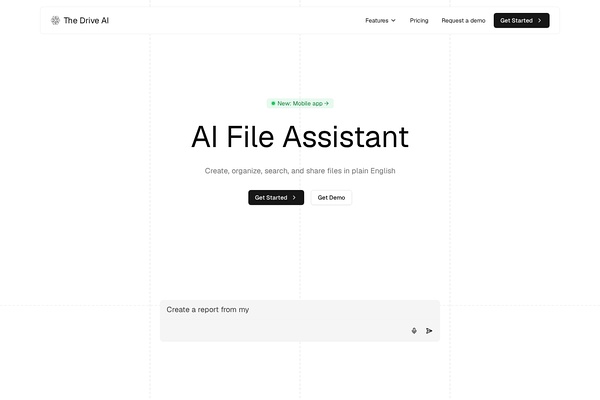
Here is a live preview of our own site, generated by the API:
https://dev.thedrive.ai/https://thedrive.aiAnd this is the image it produces:
That is a real image, generated on the fly. No screenshots, no manual uploads — just a URL.
How It Works
There is no SDK to install, no API key to register, and no authentication flow. The entire API is one endpoint:
GET https://dev.thedrive.ai/{url}Pass any publicly accessible URL, and you get back a thumbnail image. That is it.
Want to embed it? Just drop it in an <img> tag:
<img src="https://dev.thedrive.ai/https://thedrive.ai" alt="Preview" />It works anywhere you can use an image URL — in HTML, Markdown, Slack bots, emails, Notion embeds, you name it.
Supported Formats
This is where we think it really shines. We didn't build this just for websites — we built it because we needed to preview files. The API supports 107+ file types:
| Format | Examples |
|---|---|
| Documents | PDF, DOCX, DOC, PPTX, XLSX, ODT, RTF, EPUB |
| Images | PNG, JPG, SVG, WebP, TIFF, HEIC |
| Video | MP4, MOV, WebM, AVI |
| Audio | MP3, WAV |
| Code & Data | JSON, XML, YAML, HTML, CSV |
| Websites | Any public URL |
PDFs hosted on S3, slide decks on Google Drive, video files, spreadsheets — all through the same endpoint. One URL pattern to rule them all.
Customization Options
Control the output with query parameters:
GET https://dev.thedrive.ai/{url}?w=400&h=300&q=90| Parameter | Description | Default |
|---|---|---|
w | Width in pixels | 600 |
h | Height in pixels | 400 |
q | Image quality (1–100) | 95 |
nocache | Bypass cache (true) | — |
Need a small thumbnail for a card grid? ?w=200&h=150. Need a high-res preview for a lightbox? ?w=1200&h=800&q=100. You get the idea.
Beyond Static Screenshots
The same endpoint also supports GIF and MP4 output for richer captures:
- Dark mode rendering — capture how a site looks in dark mode
- Custom viewports — simulate mobile, tablet, or desktop screens
- Full-page captures — screenshot the entire scrollable page, not just the viewport
- Animated captures — GIF or MP4 for pages with animations or video content
Real-World Use Cases
1. Chat Applications
Show inline previews when users share links — no client-side rendering needed.
function LinkPreview({ url }) {
  return (
    <img
      src={https://dev.thedrive.ai/${url}?w=400&h=300}
      alt="Link preview"
      loading="lazy"
    />
  );
}
2. File Managers and Cloud Storage UIs
This is exactly why we built it. Display document thumbnails without downloading and processing files on your server.
function FileThumbnail({ fileUrl, fileName }) {
  return (
    <div className="file-card">
      <img src={https://dev.thedrive.ai/${fileUrl}?w=200&h=150} alt={fileName} />
      <span>{fileName}</span>
    </div>
  );
}
3. CMS and Blog Platforms
Auto-generate Open Graph–style previews for any link your authors paste.
4. Slack and Discord Bots
Return a preview image URL directly in your bot responses. No headless browser needed on your server.
5. Email Campaigns
Embed preview thumbnails for linked resources — recipients see a visual snapshot without leaving their inbox.
<a href="https://example.com/whitepaper.pdf">
  <img src="https://dev.thedrive.ai/https://example.com/whitepaper.pdf?w=500&h=350" alt="Download whitepaper" />
</a>
Why Not Build It Yourself?
Trust us, we tried. Here is what that journey looks like:
- Websites: Spin up Puppeteer or Playwright, manage a headless Chrome instance, handle timeouts, cookie banners, lazy-loaded content, and SPAs that render nothing on first paint.
- PDFs: Parse with pdf.js or a server-side library, render page one to an image, deal with fonts that don't embed correctly.
- Office docs: Convert DOCX/PPTX/XLSX with LibreOffice in headless mode or pay for a conversion API.
- Videos: Extract frames with FFmpeg, handle codec issues across platforms.
- Infrastructure: Run, scale, and monitor all of the above. Handle caching, error recovery, format detection, and the endless stream of edge cases.
We went through all of that so you don't have to. Prepend dev.thedrive.ai/ to the URL and move on to the feature your users actually asked for.
Integration in Under 5 Seconds
React / Next.js
const PreviewImage = ({ url, width = 600, height = 400 }) => (
  <img
    src={https://dev.thedrive.ai/${url}?w=${width}&h=${height}}
    alt="Preview"
    loading="lazy"
    style={{ borderRadius: 8 }}
  />
);
Python
from urllib.parse import quote
def get_preview_url(url: str, width: int = 600, height: int = 400) -> str:
    return f"https://dev.thedrive.ai/{quote(url, safe=':/')}?w={width}&h={height}"
cURL
curl -o preview.png "https://dev.thedrive.ai/https://thedrive.ai?w=800&h=600"Markdown
Pricing
| Plan | Credits | Cost |
|---|---|---|
| Free | 100/month | $0 |
| Pro | Pay as you go | $0.01/credit |
| Enterprise | Custom volume | Contact us |
Each screenshot costs 1 credit. The free tier gives you 100 captures per month — enough to build, test, and ship your integration.
More Than Previews
The screenshot API is just one part of the Drive AI Developer Platform. The same API key gives you access to everything:
- Extract API — pull structured JSON from any document with a schema. Typed fields, confidence scores, and source citations.
- Analyze API — multi-step reasoning over documents with sandboxed Python code execution. Ask questions, get computed answers.
- Markdown API — convert any URL or document to clean, LLM-ready markdown. Built for RAG pipelines and AI agents.
- Thumbnails API — batch preview generation for 107+ file types via
POST /api/v1/thumbnails.
All available through the same API key. Install the SDK and you get access to everything:
npm install @thedriveai/sdkpip install thedriveaiGet Started
Head to dev.thedrive.ai, grab your free API key, and try it yourself. Paste any URL — a PDF, a website, a video — and watch the preview generate in seconds.
Have questions or feedback? Reach out at contact@thedrive.ai.
Share it with your network